Table of Contents
ToggleYou’re halfway through a wash cycle when you realize you forgot to load the coffee mugs. Or maybe the door popped open when you leaned against it. Whatever the reason, your dishwasher stopped mid-cycle, and now you’re staring at a control panel wondering how to pick up where it left off. The good news? Resuming a dishwasher cycle is usually straightforward, once you know what to look for. Most modern dishwashers have built-in pause features that let you restart exactly where you stopped, but the process varies by brand and model. This guide walks through the practical steps to get your dishwasher running again, troubleshoot common issues, and avoid interruptions in the future.
Key Takeaways
- Resuming a dishwasher cycle is typically straightforward—ensure the door is fully latched and press the Start/Resume button, though the process varies slightly by brand and model.
- Door latch interruptions are the most common reason a dishwasher stops mid-cycle; a loose or misaligned latch prevents the unit from restarting until it clicks shut securely.
- If the dishwasher won’t resume, check for control locks, inspect the door latch and strike plate, clear any error codes, and verify the power supply before considering a service call.
- Regular maintenance such as cleaning filters every 2–4 weeks, maintaining door seals, and checking water supply pressure prevents most mid-cycle interruptions and extends appliance lifespan.
- A soft reset (holding the Start or Cancel button for 3–5 seconds) or a hard reset (cutting power via circuit breaker for 60 seconds) can resolve stubborn glitches that prevent resuming the dishwasher cycle.
Understanding Why Your Dishwasher Paused or Stopped
Before you hit buttons randomly, it helps to know why the cycle paused. Most dishwashers stop for one of three reasons: intentional user pause, door latch interruption, or an error condition.
Intentional pause happens when someone presses the Start/Pause button (sometimes labeled Cancel or Stop, depending on the brand). The dishwasher stays in standby mode, holding its place in the cycle. Water stays inside the tub, and the heating element cools down.
Door latch interruption is the most common accidental stop. If the door isn’t fully latched, whether from a bump, a dish blocking the seal, or a worn latch mechanism, the dishwasher stops immediately for safety. Most models won’t restart until the door clicks shut and you press Start again.
Error conditions include low water pressure, clogged filters, or drainage issues. When the dishwasher detects a problem, it halts the cycle and may flash an error code on the display. Some units will resume once the issue is fixed: others require a manual reset.
Knowing which scenario you’re dealing with saves time. If you paused it yourself or the door popped open, resuming is simple. If there’s an error code blinking, you’ll need to address the underlying issue first, more on that in a later section.
Step-by-Step: How to Resume a Paused Dishwasher Cycle
For most dishwashers, resuming a paused cycle takes just a couple of steps. Here’s the process that works across the majority of models:
-
Ensure the door is fully latched. Push it firmly until you hear the click. A loose door is the #1 reason dishwashers won’t resume. If the latch feels weak or doesn’t catch, you may have a worn door strike or latch assembly that needs replacing, a common issue after 5–7 years of use.
-
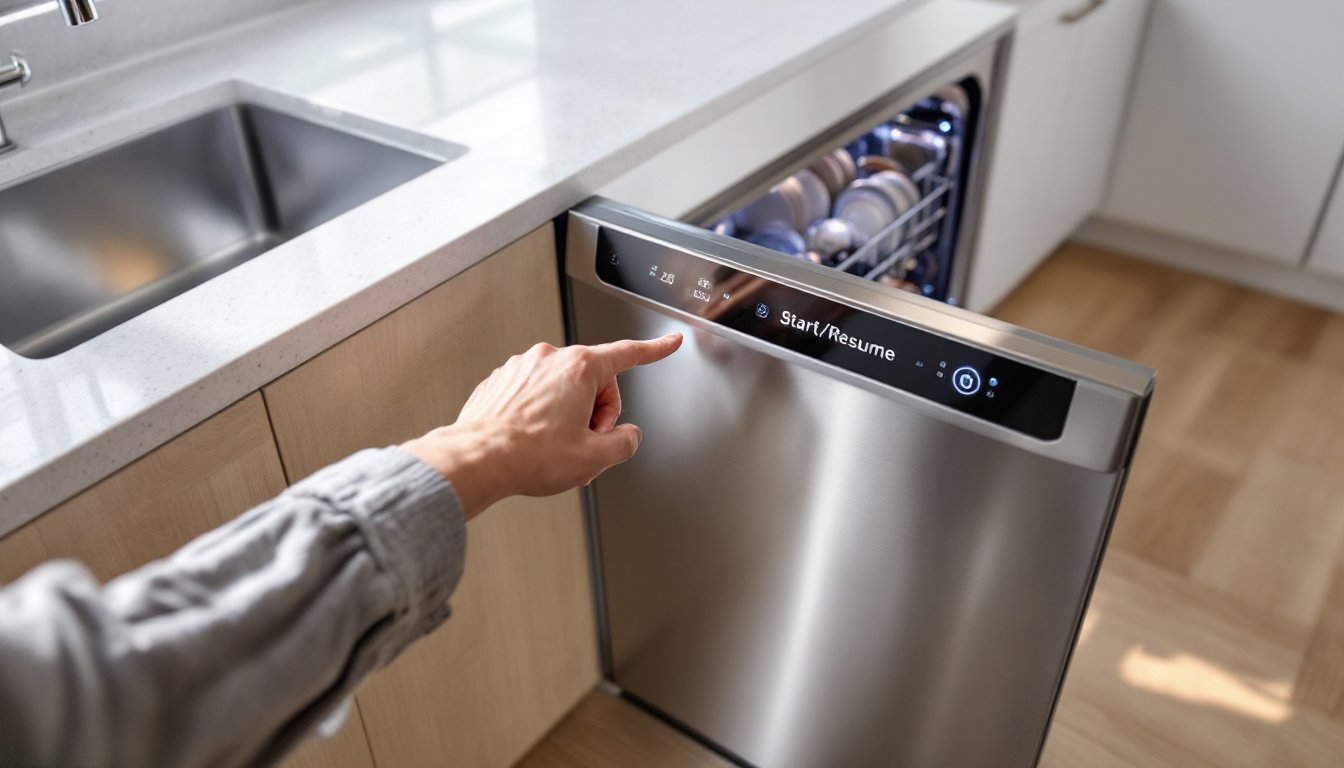
Press the Start/Resume button. On most control panels, this is the same button you used to begin the cycle. Some models label it “Start/Resume,” others just “Start.” Press it once. Don’t hold it down: a long press on some units triggers a drain cycle or reset.
-
Wait for the cycle to restart. The dishwasher may take 10–30 seconds to resume. You might hear the motor hum, the spray arm rotate, or water begin circulating. If the door was open for more than a minute or two, the unit may need to re-prime the pump or check water levels before continuing.
-
Check for indicator lights. A flashing or solid light (often green or blue) confirms the cycle is active again. If the light blinks red or the display shows an error code, the dishwasher detected a problem and won’t resume until it’s addressed.
If your dishwasher uses a dial timer instead of digital controls (common in older or budget models), turn the dial slightly forward to the next position, then back to where it was. This can jog the timer relay and restart the cycle.
One thing to note: if the door was open long enough for the water to cool significantly, some dishwashers will extend the cycle to re-heat the water to the correct temperature. That’s normal behavior, not a malfunction.
What to Do If Your Dishwasher Won’t Resume
Sometimes pressing Start doesn’t do the trick. If the dishwasher stays dark or the cycle won’t restart, try these troubleshooting steps:
Check the control lock (child lock). Many dishwashers have a control lock feature that disables all buttons. It’s usually activated by holding down a specific button (often labeled with a padlock icon) for 3–5 seconds. If the lock is on, you’ll see a padlock symbol on the display. Unlock it the same way, hold the button until the icon disappears.
Inspect the door latch and strike. A misaligned or broken latch won’t allow the door to close properly, and the dishwasher won’t start. Open the door and check the plastic strike plate on the tub frame. If it’s cracked or loose, tighten the mounting screws or replace the strike. The latch assembly itself (mounted inside the door) can also wear out: replacement latches run $20–$40 and typically install with two screws and a wire harness connector.
Look for error codes. If the display shows a code (E1, F2, etc.), consult your owner’s manual or search the model number plus the code online. Common culprits include clogged filters (preventing proper drainage), low water supply (kinked fill hose or closed shutoff valve), or a stuck float switch (which detects leaks). Clearing the error usually lets you resume, though you may need to restart the cycle from the beginning.
Test the power supply. It’s rare, but sometimes a tripped circuit breaker or a loose plug interrupts the cycle. Check your electrical panel and make sure the dishwasher’s outlet (if it uses one) is secure. Hardwired units should be on a dedicated 15- or 20-amp circuit per the National Electrical Code (NEC 422.10).
If none of these steps work and the dishwasher remains unresponsive, a control board failure or faulty door switch may be to blame. Those repairs usually require a service call unless you’re comfortable working with multimeters and wiring diagrams.
Resetting Your Dishwasher: When and How to Do It
A reset clears the dishwasher’s memory and can resolve glitches that prevent resuming. It’s different from simply restarting a paused cycle, it wipes the current program and starts fresh.
When to reset: If the control panel is frozen, error codes won’t clear, or the dishwasher won’t respond to any button presses, a reset is your next move. Also try it if the cycle resumed but the dishwasher is behaving oddly (running too long, skipping rinse stages, etc.).
How to perform a soft reset: Most dishwashers reset by holding down the Start or Cancel button for 3–5 seconds. Some models require pressing a combination of buttons simultaneously (common on Bosch and KitchenAid units, more on that below). Check your manual for the exact sequence. After the reset, the display should go blank, then reboot. You’ll need to select a new cycle and start over: the previous cycle data is lost.
Hard reset (power cycle): If a soft reset doesn’t work, cut power to the unit. Flip the circuit breaker labeled “Dishwasher” at your electrical panel, wait 60 seconds, then flip it back on. This forces the control board to fully reboot. For plug-in dishwashers, unplug the unit for a minute. (The plug is usually under the sink, behind the kickplate, or in the adjacent cabinet.) A hard reset often clears stubborn errors, but it also erases any custom settings or delay-start timers you’ve programmed.
Drain mode: If water is still sitting in the tub and you need to reset, most dishwashers have a drain-only mode. Press and hold Cancel for 3 seconds (or until you hear the drain pump engage). Let it run until the tub is empty, then try restarting a fresh cycle. Standing water can interfere with sensors and prevent normal operation.
Preventing Mid-Cycle Interruptions in Your Dishwasher
An ounce of prevention beats troubleshooting every time. Here’s how to keep your dishwasher running smoothly from start to finish:
Load dishes carefully. Tall items, oversized pots, or utensils can block the spray arm or push against the door, preventing a full latch. Before you start a cycle, spin the spray arm by hand to make sure nothing interferes with its rotation. A blocked arm reduces cleaning performance and can cause the unit to stall.
Clean the filter regularly. Most dishwashers have a removable filter at the tub bottom. Food debris, glass shards, and grease accumulate there and can clog the drain pump. Pull and rinse the filter under hot water every 2–4 weeks. A clogged filter triggers drainage errors and mid-cycle stops. (If you haven’t cleaned it in six months, do it now. You’ll be surprised what’s in there.)
Check the water supply. Low water pressure or a partially closed shutoff valve can cause fill errors. The valve is typically under the sink, next to the hot water line. It should be fully open (handle parallel to the pipe). If you have older galvanized plumbing or mineral buildup in the supply line, consider installing an inline filter to prevent sediment from clogging the dishwasher’s inlet valve.
Maintain door seals and latches. Wipe down the rubber door gasket monthly to remove food residue and detergent buildup. A dirty gasket can prevent a full seal, and a dried-out gasket can crack. If the gasket feels stiff or shows visible cracks, replace it, most are held in place by friction and pull out by hand, and new ones cost $15–$30.
Use the right detergent amount. Overloading on detergent creates excessive suds, which can trigger overflow sensors and stop the cycle. Modern appliances tested for efficiency run best with 1–2 tablespoons of detergent or a single pod, not a heaping cup.
Addressing these basics reduces the chance of interruptions and extends the lifespan of your dishwasher.
Brand-Specific Resume Instructions for Popular Dishwashers
While most dishwashers follow the same general process, some brands have unique quirks. Here’s how to resume cycles on the most common models:
Bosch: Close the door, then press the Start button. Bosch units resume automatically after a brief pause. If the control panel is locked (a key icon shows on the display), press and hold the “>” (right arrow) button for 3–5 seconds to unlock. To reset, press and hold Start for 3 seconds until the display clears.
Whirlpool and KitchenAid: These brands share the same basic control logic. Press Start/Resume once after closing the door. For a reset, press the “Heated Dry” or “Cancel” button (depends on model) for 3 seconds. Some Whirlpool models require pressing “Normal” and “Heated Dry” simultaneously to initiate a hard reset.
GE and GE Profile: Close the door firmly and press the Start/Reset button once. GE dishwashers often beep twice when resuming. If it won’t resume, try pressing and holding Start/Reset for 5 seconds to reset the cycle. GE’s older mechanical-timer models (pre-2010) may need the dial advanced slightly, then returned to position.
Samsung: Press the Start/Pause button once. Samsung displays usually show a countdown timer: it should resume counting down after you press Start. To reset, press and hold Start for 3 seconds. If “LC” or “LE” flashes (leak error), check for standing water under the unit, Samsung’s leak detection is sensitive.
LG: Close the door and press Start. LG dishwashers have excellent door latch sensors: if it won’t resume, the latch is the likely issue. For a reset, press and hold the Dual Wash (or Delicate) button for 3 seconds, depending on the model series.
Frigidaire: Press Start after closing the door. Frigidaire units sometimes require pressing Start twice to resume, once to wake the panel, once to restart the cycle. For a full reset, hold the Cancel button until the display clears and the drain pump runs.
For detailed kitchen appliance troubleshooting tailored to your specific model, keep your owner’s manual handy or download a PDF from the manufacturer’s support site using your model number (usually on a sticker inside the door frame).
Conclusion
Resuming a dishwasher mid-cycle is rarely complicated, most of the time, it’s just a matter of closing the door and pressing Start. When things don’t go as planned, checking the door latch, clearing error codes, and performing a reset usually gets you back on track. Regular maintenance (cleaning filters, inspecting seals, verifying water supply) prevents most interruptions before they happen. If you’ve tried everything here and your dishwasher still won’t resume, a service call may be in order, especially if you’re seeing recurring error codes or mechanical failures. But for the typical pause-and-resume scenario, these steps will have your dishes sparkling again in no time.